codec
What is a codec?
A codec is a hardware- or software-based process that compresses and decompresses large amounts of data. Codecs are used in applications to play and create media files for users, as well as to send media files over a network. The term is a blend of the words coder and decoder, as well as compression and decompression.
Codecs compress -- or shrink -- media files such as video, audio and still images in order to save device space and to efficiently send those files over a network such as the internet.
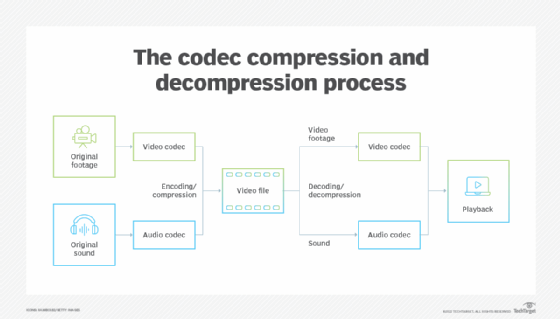
A codec takes data in one form, encodes it into another form and decodes it at the Egress point in the communication session. Codecs are made up of an encoder and decoder. The encoder compresses a media file, and the decoder decompresses the file. There are hundreds of different codecs designed to encode different mediums such as video and audio.
Codecs are invisible to the end user and come built into the software or hardware of a device. For example, Windows Media Player, which comes pre-installed with every edition of Windows, provides a limited set of codecs that play media files. Users can also download codecs to their computers if they need to open a specific file, but in those cases, it might be easier to download a codec pack or a player program. However, before adding codecs, users should first check which codecs are already installed on their system by using a software program.
Codecs serve a major purpose as, without them, media files would take up much more storage space, online downloads would take significantly longer and services like voice over IP would not be possible.
The purpose of codecs
In communications, codecs can be hardware- or software-based. Hardware-based codecs perform analog-to-digital and digital-to-analog conversions. A common example is a modem used to send data traffic over analog voice circuits. In this case, the term codec is a blend of coder/decoder.
Software-based codecs describe the process of encoding source audio and video captured by a microphone or video camera in digital form for transmission to other participants in calls, video conferences, and streams or broadcasts, as well as shrinking media files for users to store or send over the internet. In this example, the term codec is a blend of compression/decompression.
Why are codecs important?
Codecs are used for several reasons, including the following:
- Take up less space. Media files are compressed to save space. Some media files, like video files, can be huge and can take up a lot of space if not compressed. According to tech newsletter Review Geek, an uncompressed 4K video file is the equivalent of about 5 terabytes (TB) of data per hour, which is way more than Blu-ray or streaming could handle. Compressed, the file would be in the gigabyte range.
- Enable efficient transfers. If media files were not compressed, it would be much more difficult to send these files over the internet. Uncompressed files would take much longer to share, since the files are bigger and it takes more resources to send them.
How codecs work
A codec's main job is data transformation and encapsulation for transmission across a network. Voice and video codecs both use a software algorithm that runs either on a common processor or in hardware optimized for data encapsulation and decapsulation. Most smartphones also provide optimized hardware to support video codecs.
Predictive codecs use an algorithm to convert data into a byte sequence for easy transmission across a data network and then convert the byte sequence back into voice or video for reception at the endpoint.
The higher the bit rate, the less compression there is. And less compression generally means higher -- or closer to the original -- quality overall. Some codecs create smaller files with reasonably acceptable quality, but they are more difficult to edit. Other codecs create efficient files that are higher quality but take up more space. Still other codecs create small and efficient files but lack overall quality. Multimedia files that have different data streams are encapsulated together. So, for example, a multimedia file that has both audio and video is encapsulated together.
Types of codecs
Codecs exist for audio-, video- and image-based media files. These codecs are categorized by whether they are lossy or lossless and compressed or uncompressed. Lossy codecs reduce the file's quality in order to maximize compression. This minimizes bandwidth requirements for media transmission. Lossy codecs capture only a portion of the data needed by a predictive algorithm to produce a near-identical copy of the original voice or video data. Lossy codecs produce manageable file sizes, which are good for transmitting data over the internet.
Lossless codecs have a data compression algorithm that enables the compression and decompression of files without loss of quality. This is good for preserving the original quality of the file. Lossless codecs capture, transmit and decode all audio and video information at the expense of higher bandwidth requirements. Lossless codecs are a good fit for film, video and photo editing.
Lossy compression also has different compression techniques that are defined as intraframe or interframe. Intraframe compression uses the equivalent of still image compression in video. Each frame is compressed without using any other frame as a reference. In contrast, interframe compression compresses video files by considering the redundancies between frames. This type of compression uses an encoding method that only keeps the information that changes between frames. Although intraframe codecs have a higher data rate when compared to interframe codecs, intraframe codecs require less computing power to decode on playback.
Examples of popular codecs
There are hundreds of codecs, and the typical user requires multiple to play different types of video, audio and image files.
Audio codecs include the following:
- Advanced Audio Coding (AAC)
- Apple Lossless Audio Codec (ALAC)
- Free Lossless Audio Codec (FLAC)
- Global System for Mobile communications (GSM)
- Internet Low Bitrate Codec (iLBC)
- Waveform Audio File Format (WAV)
Still image codecs include the following:
- Joint Photographic Experts Group (JPG/JPEG)
- Tag Image File Format (TIFF)
- Portable Network Graphics (PNG)
Video codecs include the following:
- Apple ProRes
- Digital Nonlinear Extensible High Definition (DNxHD)
- 264
- High Efficiency Video Coding (HEVC)/H.265
- VP8/VP9
H.264 is a notable and widely used codec as, depending on the encoding settings, it can be set to lossless or lossy compression. This codec is used with digital videos and can play on a wide variety of devices. For example, H.264 is used for live streaming, cable TV and Blu-ray disks. Even though H.265 is newer and is meant to replace H.264, H.264 is still widely used. But H.265 has better compression efficiency, which means it is able to produce smaller files. H.265 was also the first codec to support 8K resolution.
Learn more about codecs and some bug fixes within Windows codecs.